Learn more about our other Greenwich Aerogroup companies


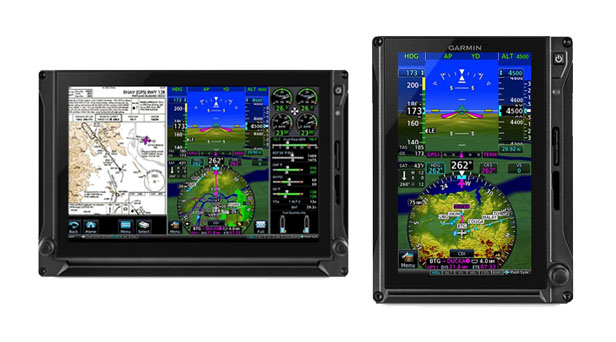
Garmin’s G600 TXi offers a powerful blend of advanced avionics, intuitive display features, and enhanced safety tools—bringing new levels of confidence, clarity, and control to every flight.
Primary Flight Data: View attitude, airspeed, altitude, heading, vertical speed, and HSI navigation with full lateral and vertical guidance.
Versatile Display: Seamlessly switch between full-screen PFD and split PFD/MFD modes for optimal situational awareness.
HSI Mapping: Gain MFD-like perspective mapping right in your PFD—overlaying terrain, traffic, weather, SafeTaxi® diagrams, and more.
Synthetic Vision Technology: Built-in SVT™ delivers 3D terrain, obstacle, and airport depictions for enhanced situational awareness.
Reliable Reversionary Mode: In case of a display failure, remaining screens display essential flight and EIS data.
Smart Glide™ Compatibility: In piston singles, G600 TXi supports engine-out navigation to the nearest airport.
Pilot Profiles: Save custom settings for quick system preference recovery before each flight.
Smart Rudder Bias: For select piston twins, emergency engine-out assistance is enabled when paired with GFC 600 and yaw damper.
Garmin’s G600 TXi delivers powerful traffic and weather awareness. When paired with a GTX™ 345 or GDL 88, it displays ADS-B “In” traffic and weather, enhanced by TargetTrend™ and TerminalTraffic™ technologies for intuitive tracking. It also integrates with select TAS and TCAS systems for advanced traffic surveillance. Add a GDL® 69A for SiriusXM® weather and entertainment, or the GWX™ 75 radar for Doppler-based onboard weather with turbulence detection. For global coverage, the GSR 56 provides satellite weather via Iridium®. The MFD also supports multiple video inputs, turning it into a live camera display when needed.
G600 TXi offers georeferenced charts, dynamic topography, and interactive mapping with pan and zoom. Built-in terrain alerting and SafeTaxi® diagrams enhance situational awareness. Tap anywhere on the map for key flight data, and easily tune radios via GTN integration—all designed for intuitive, context-rich navigation from takeoff to taxi.
Upgrade your King Air with Garmin’s G600 TXi—an advanced, all-in-one flight display solution that delivers enhanced situational awareness, engine monitoring, traffic and weather integration, interactive mapping, and intuitive touchscreen control. From precise navigation and synthetic vision to real-time engine data and fuel management, G600 TXi brings modern capability to every phase of flight.
Ready to talk about upgrading the flight display for your King Air? Fill out the form below and we’ll be in touch!
"*" indicates required fields
